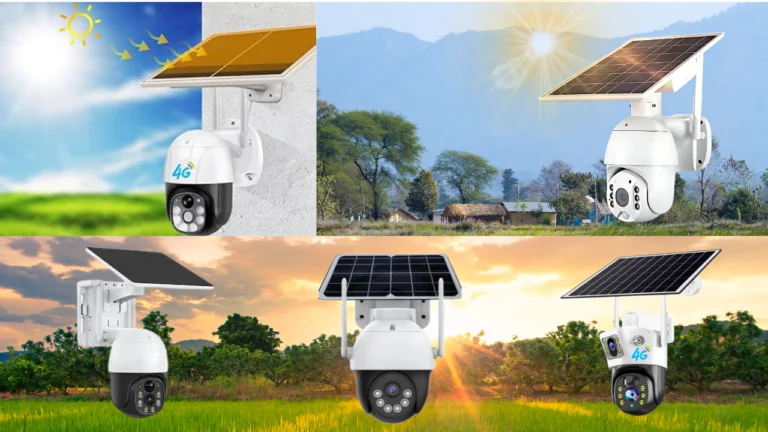
Solar cameras are popular for outdoor surveillance due to their energy efficiency, wireless connectivity, and simplicity of installation. Nevertheless, nighttime surveillance can be problematic, especially when there is little lighting, and the camera runs on batteries. Knowledge of the correct night vision tricks for solar cameras can greatly enhance the quality of images, accuracy of motion detection, and overall night vision performance.
This article will discuss techniques and tips on how to make solar cameras perform optimally for night vision without consuming much battery power.
How Night Vision Functions in Solar Cameras
The majority of solar cameras employ infrared light-emitting diodes (IR LEDs) to record images in low-light or nighttime conditions. As the intensity of ambient lighting decreases, the solar camera automatically transitions into night vision mode, turning on IR lighting. Some high-end solar cameras also support color night vision with spotlights or improved low-light sensitivity.
Since solar cameras operate on solar energy storage, night vision performance needs to be carefully optimized to strike a balance between image visibility and battery power.
Optimize Camera Positioning for Enhanced Night Vision
Correct positioning is one of the best night vision tips.
- Position the camera away from reflective surfaces such as walls or metal to avoid IR glare.
- Position the camera 7-10 feet high for optimal motion detection.
- Do not position the camera directly at bright light sources, as this can impair night vision quality.
- Position the solar panel to maximize daylight exposure to charge the battery to its fullest potential.
Correct positioning alone can significantly enhance the quality of night vision footage.
Adjust Infrared Settings
Some solar-powered cameras enable manual adjustment of IR sensitivity.
- Reduce IR brightness if night vision images are too washed out.
- Increase IR range for larger outdoor areas.
- Switch to auto IR mode to adjust to changing light conditions.
Use Motion-Activated Recording Rather Than Continuous Recording
Continuous recording takes more battery power, particularly at night.
Best practice:
Turn on motion-activated recording with adjustable sensitivity settings. This way, the camera will only turn on when there is motion, extending battery life without missing critical events.
To enhance accuracy:
- Lower sensitivity to prevent false notifications from insects or wind
- Create custom activity zones.
- Turn On Color Night Vision Strategically
Some solar-powered cameras come with color night vision capabilities through spotlights or low-light cameras.
Trick:
Activate color night vision only in high-risk zones like entrances or driveways. Although color night vision offers better image quality, it drains battery life faster than infrared night vision.
Toggle between infrared night vision and color night vision depending on the location and security requirements to extend battery life.
Keep the Camera Lens Clean
A dirty lens can cause night vision images to be of poor quality.
- Clean the lens with a microfiber cloth
- Remove dust, water spots, and spider webs.
- Check for condensation after rain.
Clean lenses allow infrared light to work properly, providing clearer night vision images.
Improve Ambient Lighting Without Overpowering IR
Soft ambient lighting around the camera can improve night vision.
- Use low-wattage LED lights.
- Do not direct light at the lens.
- Position lights at an angle to minimize glare.
This tip works well without affecting infrared sensors or the camera battery.
Update Firmware and Use Smart Settings
Firmware updates from the manufacturer can optimize night vision and motion detection.
- Enable auto-updates in the camera app.
- Adjust night vision exposure and contrast.
- Enable AI human detection if available.
Software optimization can be as effective as hardware adjustments.
Protect the Battery for Consistent Night Performance
Night vision relies on battery performance.
Tips to optimize battery performance:
- Clean the solar panel and keep it unobstructed.
- Avoid extreme shading during the day.
- Use power-saving modes
- Select a camera with a high-capacity battery.
A fully charged battery ensures night vision functionality even in prolonged darkness.
Minimize False Alarms During Nighttime
False alarms can cause battery drain and affect the system’s reliability.
To reduce false alarms:
- Turn down motion detection sensitivity during night hours
- Avoid areas with moving trees and roads from being included in the detection area
- Activate human-only detection modes
By avoiding unnecessary alarms, the camera can concentrate on actual security risks.
Conclusion
Using the best night vision techniques for solar-powered cameras can greatly enhance night security system performance. By making a few tweaks in camera placement, IR settings, battery management, and software upgrades, solar-powered cameras can provide better night vision with higher image quality, fewer false alarms, and longer battery life.
Solar-powered cameras can provide reliable night security surveillance without compromising energy efficiency and reliability.
